

Employee self-service · HivePayroll
Payslips, Form 16, leave balances and tax, answered by employees themselves.
Nineteen screens in each employee’s own space, so the questions around the payroll run stop landing on HR.
The payroll questions you should never have to answer
Ask any payroll or HR person in India where their month goes and the answer is rarely the payroll run. It is the questions around it.
What an employee can do without asking anyone
HivePayroll gives every employee their own space with nineteen screens in it. The ones that remove the most work from HR:
Pay and tax
- My payslips: my payslip and my Form 16, downloaded directly, no request
- My salary: what my salary is made of, and what tax was taken
- My tax sheet: why my tax changed this month; the full computation, with the regime marked
- My declaration: submit my investment declaration, filtered by tax regime
Leave and attendance
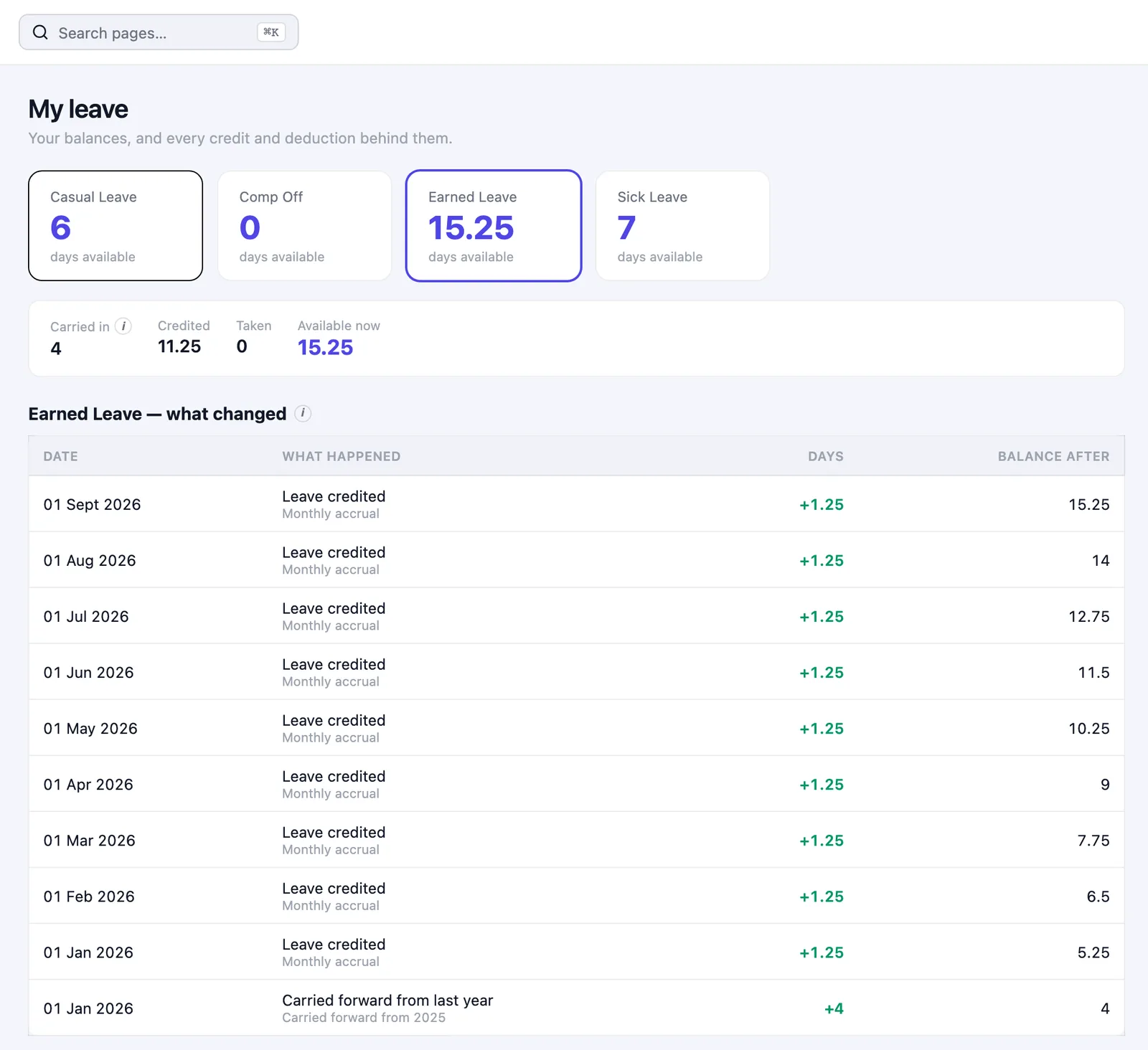
- My leave passbook: how many leaves I have, and how I got there; every day added, taken, lapsed or encashed
- My leave: apply for leave and track the request
- My attendance calendar: my attendance and hours, day by day
- Attendance corrections: “that Tuesday is wrong”, raised by the employee, approved in a queue
- My holidays: which holidays apply to me, including optional holidays I choose
Claims, loans and records
- My claims: claim an expense, with the bill attached
- My loans: where my loan repayment has reached
- My LTA, My flexi benefits: my LTA and flexible benefit choices
- My documents, My profile: my documents and my own record
The home page that answers most of it at a glance
Latest payslip
On the personal home page.
Leave balance
The current balance, in the same place.
This month’s attendance
Alongside the payslip and leave.
Running timer
On a day someone has checked in, it shows the hours as they build.
The leave passbook is the one that ends arguments
Almost every leave dispute is the same shape: the employee believes the balance is wrong, and nobody can show how it was reached.
Managers get a space too
The problem
The requests that pile up on HR are often requests a manager should have handled.
A team inbox
In HivePayroll a manager sees their team’s attendance and the approvals waiting on them directly (leave, attendance corrections, claims) without HR standing in the middle.
Security, because self-service means more people signing in
Two-factor sign-in
Available for organisations that want the extra check.
Staff accounts and permissions
Decide what each person can see, so self-service widens access without widening exposure.
Your own address
yourcompany.hivepayroll.in, so your people sign in at your URL, not a shared login page.
What this actually saves
Self-service is usually sold on employee experience. The harder argument is the payroll team’s calendar. These are the five recurring interruptions in an Indian payroll month, and all five move to the employee here:
- Payslip requests
- Form 16 requests
- Leave balance questions
- Declaration chasing
- Attendance corrections
Frequently asked questions
Can employees download their own Form 16?
Yes. Form 16 and payslips are available in the employee’s own space without a request to payroll.
Can an employee see how their leave balance was calculated?
Yes. The leave passbook shows every day added, taken, lapsed, carried forward or encashed, and why, so any balance can be traced rather than argued about.
Can employees fix a wrong attendance day themselves?
They can raise a correction, which goes to an approval queue rather than being applied directly. Approved corrections appear in the regularisation register with who approved them and when.
Do managers have to go through HR to approve leave?
No. Managers see their team’s attendance and pending requests in their own team inbox and approve directly.
Is there a mobile app?
Yes, there is an Android app, and the employee space works in a mobile browser. Web and mobile check-in is supported, with an optional office-location boundary.
Can employees see their tax computation?
Yes. The tax sheet shows income, accepted declarations, exemptions, the liability and what has been deducted so far, with the tax regime marked. See TDS and income tax management.
Give your payroll team their month back
Count last month’s questionsThe quickest way to judge self-service is to count how many questions your payroll team answered last month that the employee could have answered themselves. Book a free demo, or see HivePayroll pricing. HivePayroll is free for up to 10 employees.