
hivepayroll logo

Employee Leave Management System

Managing employee leaves can be a tedious and time-consuming task. Our Employee Leave Management software simplifies the process by automating leave requests, approvals, and tracking.

payroll and leave management software
Simplify Payroll and Leave Management with Our Software

Simplify Leave Management With Our Flexible And Efficient Payroll Software

HivePayroll offers automated leave management. Both HR and employees can get more done in less time with HivePayroll leave management. HR can keep track of who’s off, can set holiday blackouts when you don’t want the team to have time off, set statutory holidays, etc. Employees can keep track of their holiday allowance, leave approval, central team calendar, etc.

Simplify leave management with our flexible and efficient payroll software.​

Efficient Way to Manage Employee Leaves

01

Quick information

HivePayroll tracks employees leave 24x7, therefore your supervisors and managers will have quick access to necessary information to be able to approve or decline an employee’s leave request instantly

02

Accuracy

HivePayroll leave management is integrated with the payroll. Therefore, on approval of employee's leave request, it will reflect in his or her pay calculation automatically. Automation of leave process and integration with payroll makes it an accurate leave management solution

03

Constant Reminders

HivePayroll sends reminders to the managers for outstanding leave requests. This makes sure that the employee doesn’t need to chase the manager again and again and this helps in keeping your employees motivated. At the same time, this keeps managers up-to date with their leave management

04

Flexibility

HivePayroll offers you enough flexibility to modify and implement your leave policies anytime, if required. If any policy makes a team or employee ineligible for a particular leave, the system will automatically flag it at the time of leave request. Therefore, managers don't have to keep track of who is entitled to which leave

05

High employee satisfaction

HivePayroll makes overall leave process smooth and transparent for the employees and managers. Employees don’t have to spend time on chasing their leave approvals and they can keep track of the status of their leave request. Employee will always have record of all leaves take and the leave allowances remaining for the period. The overall process increases the employee satisfaction

06

Save time and money

Automated process of HivePayroll leave management make process fast and smooth for both managers and the employees. This in return save your time on small things such as paying a visit to your manager for approval or processing papers work by managers for leave approval and then in submitting information with HR or Payroll team. Overall, it contributes in saving time, money and effort.

Our Leave Management Software Is The Solution You've Been Looking For​

Put your HR department on autopilot - Let them fly

Our software is designed to simplify the entire leave management process, allowing your HR department to focus on more important tasks. From time off requests and approvals to leave policy configuration, HivePayroll's Leave Management Software handles it all.

Leave management with HivePayroll - It’s your license to chill

Say goodbye to the stress of managing employee leave manually. Our software provides an easy-to-use interface for employees to submit time off requests, while giving managers the tools they need to approve or deny requests quickly and easily.

Multiple leave policies and needs - One solution that manages it all

With our software, you can create and manage multiple leave policies and accrual rates to meet the unique needs of your business. Whether you have full-time, part-time, or contract employees, our software can handle it all.

Statutory compliance - No more rocket science

Staying compliant with local and federal leave laws can be complicated, but HivePayroll's Leave Management Software makes it easy. Our software ensures that your company is always in compliance with the latest leave regulations, saving you time and headaches.

Dashboards, reports & analytics - A goldmine of insights

Our software provides powerful reporting tools that give you real-time visibility into your leave management process. With our dashboards, reports, and analytics, you can quickly identify trends and make informed decisions to improve your HR processes.

Smart choice for any business

Investing in HivePayroll's Leave Management Software is a smart choice for any business looking to streamline their HR processes and improve employee satisfaction. Contact us today to learn more and schedule a demo.

Trusted By

W S and Associates LLP logo - HivePayroll customer
Tork Motors logo - HivePayroll customer
Syndrome Tech logo - HivePayroll customer
Technource logo - HivePayroll customer
SKIDOS logo - HivePayroll customer
Open bank

Most leave software breaks on the policy you actually have

Leave modules are easy to build for a company that gives everyone eighteen days on 1 January. They fall apart on the policies Indian companies actually run: accrual that starts on the joining date rather than the calendar year, a different entitlement by grade, carry-forward capped at a percentage rather than a number, half-day rounding, maternity leave that applies to some employees and not others.

The usual outcome is a parallel spreadsheet — the software runs the simple cases and someone maintains the exceptions by hand. HivePayroll’s leave engine is built to remove that spreadsheet.

What you can configure

A leave rule in HivePayroll is not a number of days. It is a policy, and each part of it is set independently:

SettingOptions
Accrual scheduleUpfront, monthly, quarterly, half-yearly or annual
Accrual timingBeginning or end of the period
Accrual anchorThe calendar year, or each employee’s date of joining
Credit methodA flat number, a tiered figure, or a formula based on days present
Tiered byTenure, designation or grade
ProrationNone, by calendar days, or by working days — on joining and on exit, set separately
RoundingNone, half up, to the next or previous half day, or to the next or previous whole day
Year endReset to zero, carry forward, or encash
Carry-forward capA fixed number of days, or a percentage of the balance
Going negativeAutomatically convert to loss of pay, or allow a negative balance
Who it applies toEveryone, or filtered by gender and marital status
Encashment rateA fixed amount per day, or derived from a salary component

Those last two matter more than they look. Gender and marital-status eligibility is how maternity, paternity and marriage leave get configured without maintaining separate employee lists. And a tiered credit by tenure is how “twelve days for the first two years, eighteen after that” becomes a rule instead of an annual manual adjustment.

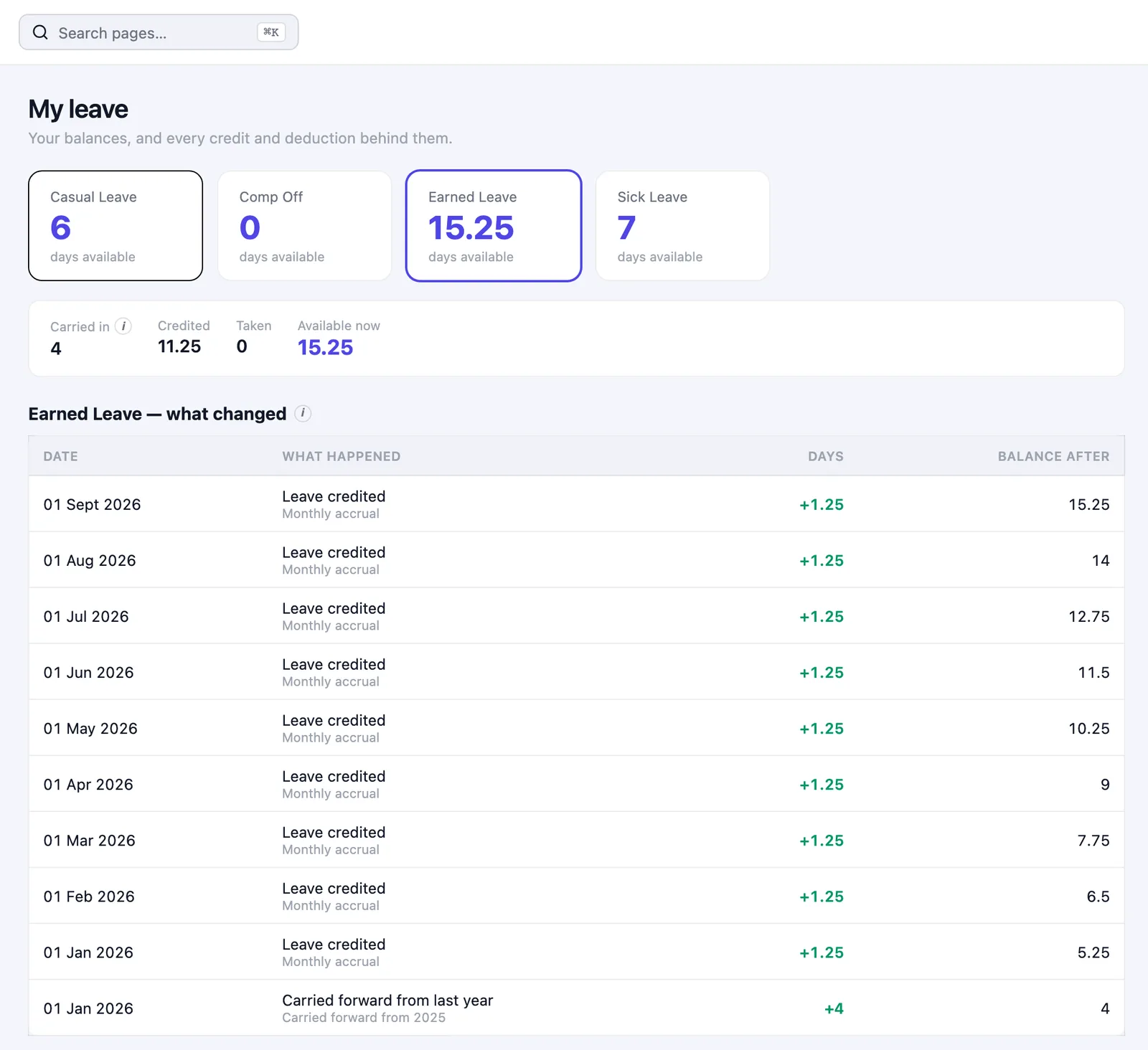
Every balance can be explained

The most common leave dispute is not about policy. It is an employee who thinks the balance is wrong and an HR team that cannot prove otherwise.

Every leave balance in HivePayroll sits on top of a ledger — a record of every day added, taken, lapsed, carried forward or encashed, and why. When someone asks how they got to 7.5 days, you can show them rather than recalculate it. Employees can see their own, as a leave passbook, without asking anyone.

Year-end processing, with a preview

Carry forward, lapse and encashment run together as one year-end process — and it previews before it commits. You see what each employee’s balance will become, and what the encashment will cost, while it is still reversible. A year-end run that has been previewed and not yet committed changes nothing.

Comp-off, including the part everyone forgets

Comp-off policies cover the earning side and the expiry side. Unused compensatory off that never expires quietly becomes an unfunded liability; HivePayroll lets you set when it lapses, and shows you what is about to.

Optional holidays employees choose themselves

Where you run a floating or optional holiday list, employees pick the ones they want from the calendar and those picks go through approval like any other request — rather than arriving as an email to HR in December.

Holiday calendars can differ by site, so a Bengaluru office and a Pune plant do not have to share one list.

Applying, approving and getting on with it

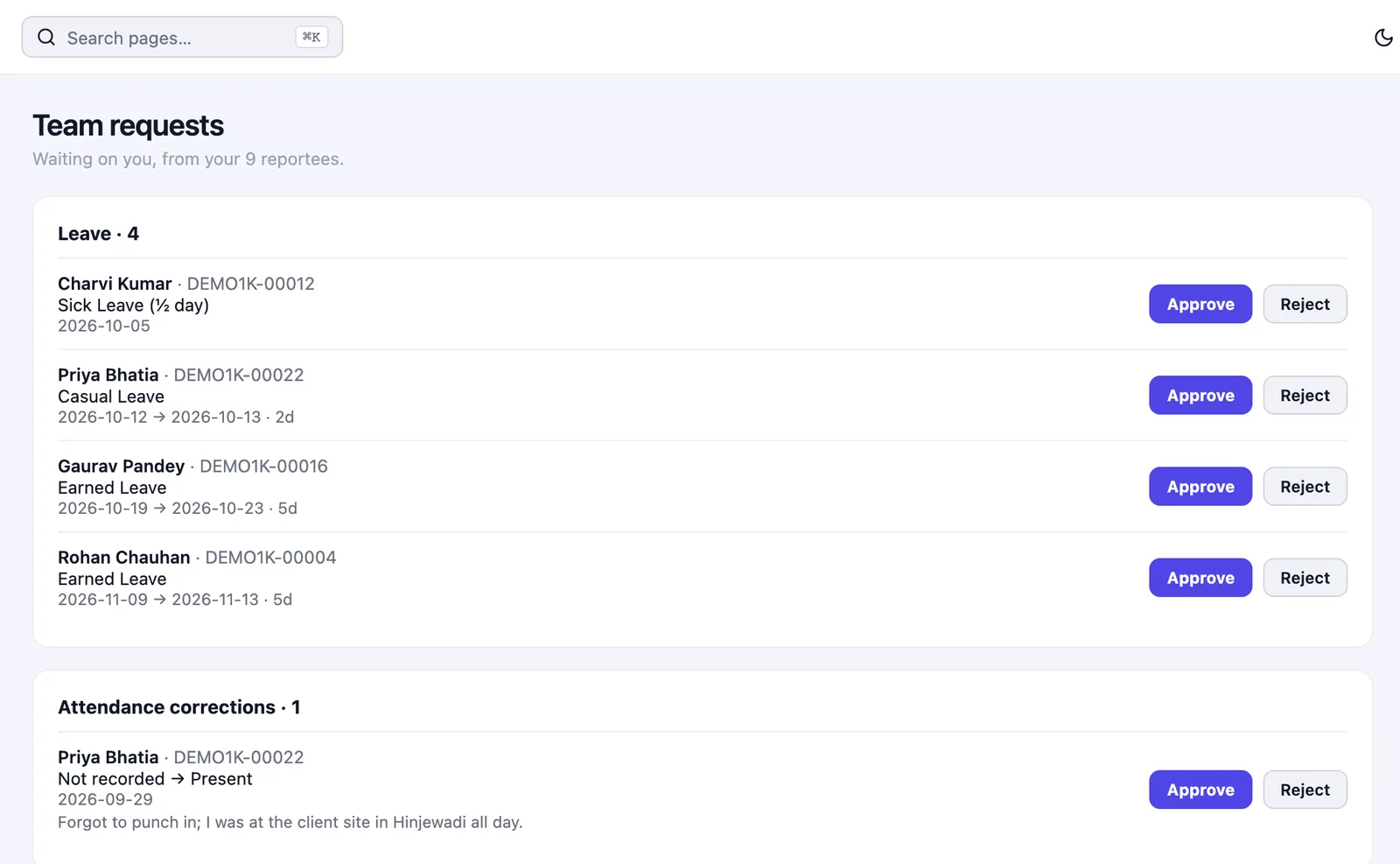
Employees apply from their own space and can see exactly where the request has reached. Managers approve their team’s requests directly instead of routing through HR. Where a request needs more than one approval, an approval workflow decides who it goes to.

Moving from your current system

Leave is the hardest thing to migrate, because you are not moving a number — you are moving a number that has to stay defensible. HivePayroll has a migration process that analyses your existing rules, flags the ones that will not translate cleanly, previews the resulting balance for every employee, and only then commits.

You see the per-employee opening balance before anything is written, which means the conversation about a wrong balance happens before go-live rather than in the first month.

Frequently asked questions

Can leave accrue from the joining date rather than the calendar year?

Yes. Accrual can be anchored to the calendar year or to each employee’s date of joining, and prorated on joining and on exit independently, by calendar days or working days.

Can different grades get different entitlements?

Yes. Credit can be tiered by tenure, designation or grade, so one rule covers a policy that varies across the organisation instead of needing a rule per group.

What happens to unused leave at year end?

Whatever you configure: reset to zero, carry forward, or encash. Carry-forward can be capped at a fixed number of days or a percentage. All three run in one year-end process with a preview before it commits.

Can an employee go into a negative balance?

Your choice per rule. Either the excess automatically becomes loss of pay in the payroll run, or the balance is allowed to go negative and recovers as leave accrues.

How is maternity or marriage leave restricted to the right employees?

Rules can be filtered by gender and marital status, so eligibility follows the employee record instead of a manually maintained list.

Can employees see how their balance was calculated?

Yes. The leave passbook shows every day added, taken, lapsed, carried forward or encashed, with the reason for each.

Bring your hardest rule to the demo

The fastest way to test leave software is to make it configure the policy you currently maintain by hand. Book a free demo and bring that rule — not the simple one. Or see HivePayroll pricing; every plan includes a 15-day free trial.

Related: attendance and timesheets · the payroll management process · leave and payroll reports

Awards & Recognition

× WhatsApp Chat