

Payroll management process · India
The monthly payroll run in six steps, in the order that keeps mistakes out of payslips.
Most of the pain in payroll comes from doing the steps out of order: running payroll before attendance is settled, filing before the data is clean, discovering a wrong payslip after the money has moved. This is the order HivePayroll is built around.
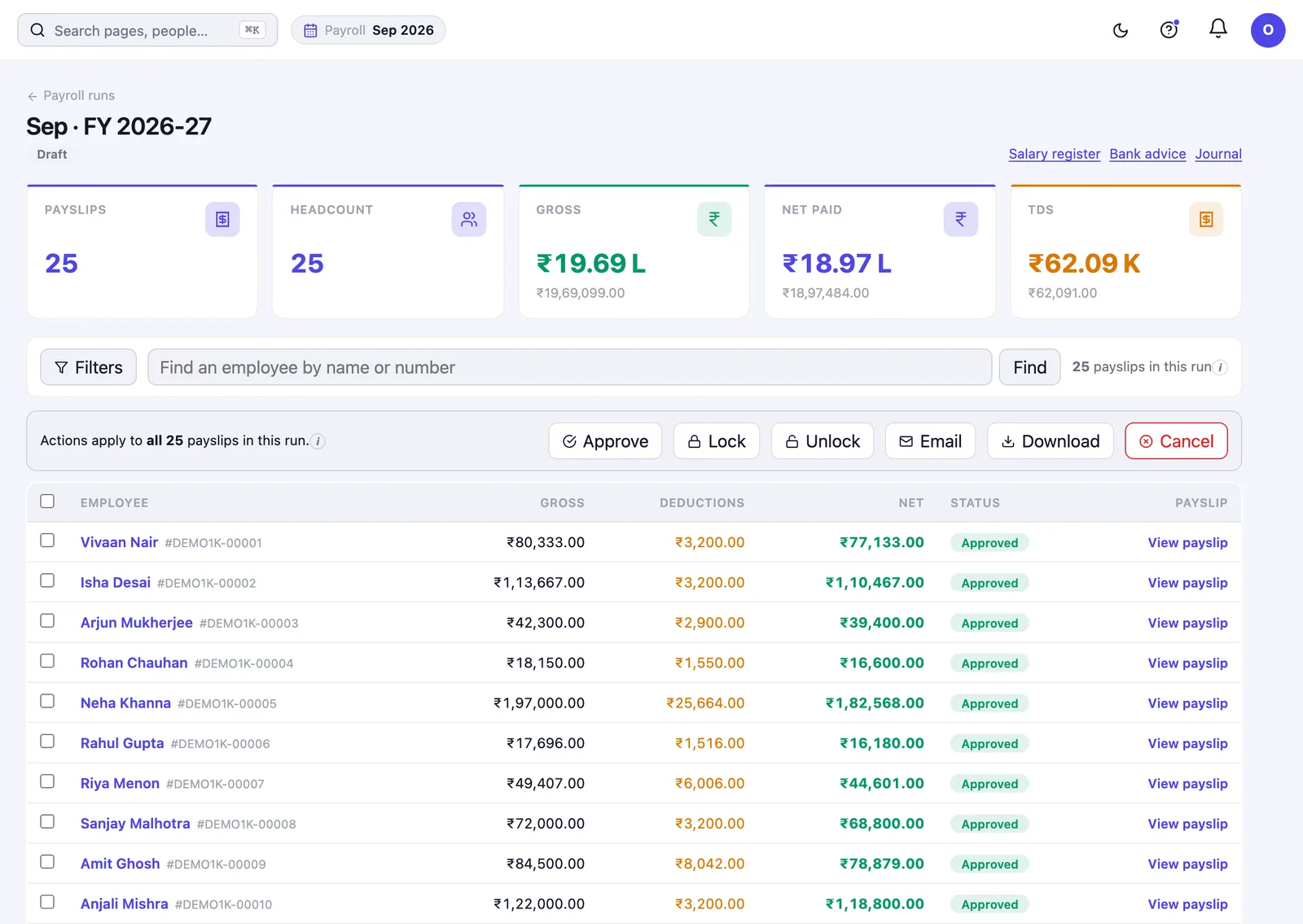
The monthly payroll run, step by step
- Settle attendance before you run anything. A pre-payroll attendance report shows the month exactly as payroll will read it. Exceptions get resolved here (the forgotten check-outs, the pending corrections, the shortfalls) while fixing them is still cheap. See attendance and timesheets.
- Run payroll. You can run the whole company, or run payroll for the specific people you name, which is what you want for a mid-month joiner, a correction, or a single held salary, rather than reprocessing everyone on the same salary structure.
- Check the run before it becomes payslips. The run detail shows what was calculated and for whom. Loss of pay is capped so it can never come to more days than the month actually has, a class of error that is easy to miss and expensive to reverse.
- Publish payslips. Payslips are available to employees in their own space, and can be taken as one document for several employees or as one file each.
- Pay people. The bank advice file is produced ready to hand to the bank, with anyone missing account details flagged first: before the file goes, not when it bounces.
- File what is due. PF ECR, ESIC, Professional Tax, LWF, NPS and the TDS position all come out of the run you have just completed. See statutory compliance and TDS management.
What else goes into a payroll run
Salary is rarely just salary. HivePayroll handles the things that sit alongside it in the same run:
Loans and advances
With recovery scheduled against the payroll they come out of.
Reimbursements and expense claims
Submitted by employees and reviewed before they are paid. See expense reimbursement.
Flexible benefits and LTA
Selected by the employee and reflected in the tax computation.
Arrears and increments
Applied to the periods they belong to.
Exits and full and final settlement
Handled end to end, including a held salary, and the months a leaver was never paid for.
Salary structures
The components (earnings, deductions and employer contributions) that make up a CTC, and how each behaves for tax and statutory purposes. Employees see the breakdown of their own salary and what tax has been taken, without asking payroll for it.
Setting up: the parts that decide everything later
Most payroll problems are configuration problems that surfaced three months in. What you set up first:
Masters
Departments, designations, grades, cost centres, business units, locations and employment types. Every report filters by these, so getting them right is worth an hour.
Holiday calendars
Which can differ by site.
Leave rules
See leave management.
Approval workflows
So a request reaches the right person rather than the nearest one.
Staff accounts and permissions
Deciding who can see what.
Letter templates
For offer, confirmation and experience letters.
Onboarding someone new
You can add an employee in four fields and complete the rest from their profile when you have it, which matches how hiring actually works, where the PAN arrives a week after the joining date. A guided joining checklist makes sure nobody starts work on a half-finished record, and one profile page holds pay, leave, attendance, documents, statutory details and history. See onboarding and exits.
Knowing what happened, and who did it
History and activity log
Every employee record carries a full history of who changed what and when, and an activity log covers the wider system. When a figure is questioned six months later, the answer is in the record rather than in someone’s memory.
Two dashboards
A yearly and a monthly payroll dashboard show headcount, gross, net, tax and statutory, with last month beside this one. It is the fastest way to catch the month where something moved that should not have.
Getting started
- Sign up free. HivePayroll is free for up to 10 employees, with no time limit and no credit card.
- Practise on sample data. Sample data is provided when you sign up; run payroll on your actual data whenever you are ready.
- Grow into a paid plan when you need one. For more than 10 employees, or for phone check-in, biometric attendance and shifts, choose a plan priced by team size, billed yearly or monthly. If a free account grows past 10 employees, you get 15 days to choose a plan and nothing stops working in the meantime. No fixed-term contract is required.
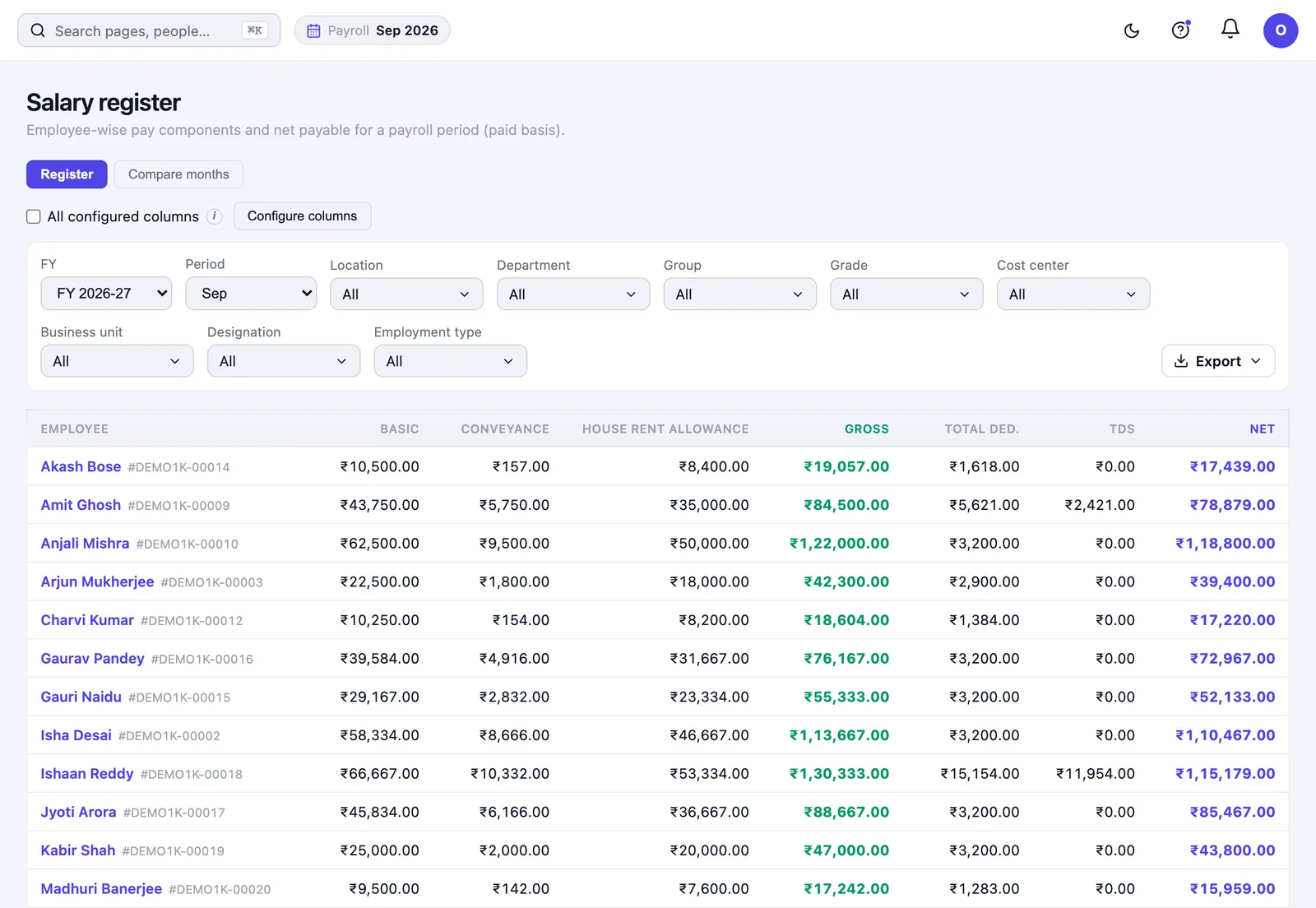
Frequently asked questions
Can I run payroll for just a few employees?
Yes. You can run payroll for the specific people you name rather than reprocessing everyone sharing a salary structure — the usual case for a mid-month joiner or a single correction.
How do full and final settlements work?
Exits are handled end to end, including the final settlement, a held salary, and settling months a leaver was never paid for.
Can I check a payroll run before employees see it?
Yes. The run detail shows what was calculated and for whom before payslips are published, and a pre-payroll attendance report lets you settle the inputs before the run at all.
Does HivePayroll produce a bank file?
Yes — a bank advice file ready to hand to the bank, with employees missing account details flagged before it is generated.
Can employees get their own payslips and Form 16?
Yes, from their own space, without going through payroll.
How long does it take to get started?
HivePayroll is free for up to 10 employees, with no time limit, so you can run full payroll cycles on your own data rather than a demo dataset. Existing leave balances can be migrated with a per-employee preview before anything is committed.
Run one real monthNo demo tells you as much as one full cycle on your own data. Book a free demo to get set up, or see HivePayroll pricing. HivePayroll is free for up to 10 employees.